VPN Split Tunneling Setup Guide: Step-by-Step Instructions for Beginners
Understanding VPN Split Tunneling
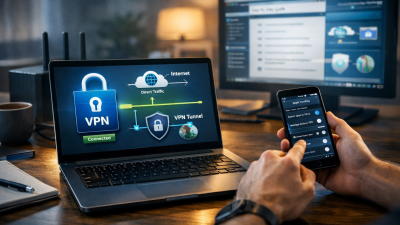
VPN split tunneling is a powerful feature that allows you to route some of your internet traffic through a VPN while letting other traffic access the internet directly. This setup is particularly useful when you want to secure sensitive data without slowing down your entire connection. By using split tunneling, you can maintain privacy for specific apps while keeping local services or streaming faster.
Setting up split tunneling might seem complicated at first, but with this vpn split tunneling setup guide, beginners can follow a structured approach to implement it correctly. Whether you’re using Windows, macOS, or mobile devices, the steps are manageable and effective.
Benefits of Using VPN Split Tunneling
One major advantage of split tunneling is optimized network performance. Traffic that doesn’t need encryption can bypass the VPN, reducing bandwidth usage and improving speed. This is ideal for tasks like online gaming, streaming, or accessing local network devices.
Another benefit is enhanced flexibility. You can choose which apps, websites, or IP addresses use the VPN connection. This makes it easier to balance privacy and convenience, allowing secure browsing for sensitive operations while keeping other activities seamless.
Finally, split tunneling can help avoid geographic restrictions selectively. For example, you might access local services without disconnecting from a VPN needed for other regions. This strategic routing saves time and reduces frustration caused by blocked services.
Preparing for VPN Split Tunneling Setup
Before starting the vpn split tunneling setup guide, ensure you have the right tools. First, select a VPN service that supports split tunneling, as not all providers offer this feature. Check your VPN client’s documentation for compatibility and system requirements.
Next, identify which traffic you want to route through the VPN. Common examples include web browsers for sensitive data, email apps, or business software. At the same time, decide which apps or services should bypass the VPN for faster access.
Lastly, make sure your device has a stable internet connection and administrative access to modify network settings. This preparation helps avoid common errors during the setup process.
Step-by-Step VPN Split Tunneling Setup
1. Install and Launch Your VPN Client
Begin by installing your VPN client on your device. After installation, log in with your credentials and access the settings or preferences menu. Look for an option labeled Split Tunneling, App Split Tunneling, or Routing.
2. Select Applications or IP Addresses
Most VPN clients let you choose apps to include or exclude from the VPN tunnel. Use the interface to mark applications that require a secure connection. Alternatively, some clients allow IP-based routing, letting you specify which websites or servers use the VPN.
3. Configure Split Tunneling Rules
Decide whether you want to exclude apps from the VPN or only route selected apps through the VPN. Exclusion is useful for high-speed apps that don’t need encryption, while inclusion is safer for privacy-sensitive apps. Carefully review the list to ensure you don’t accidentally expose private data.
4. Save and Apply Settings
After making selections, save your changes. Most VPN clients will require you to reconnect for the settings to take effect. Test your configuration by checking which traffic is going through the VPN using online tools or VPN diagnostics.
5. Verify Functionality
Open both VPN-enabled and bypassed apps to ensure traffic routing works correctly. For example, try streaming a local service through a bypassed app and access a secure website through a VPN-enabled browser. If everything functions as expected, your split tunneling setup is complete.
Tips for a Smooth Split Tunneling Experience
Always keep your VPN client updated to avoid compatibility issues. Software updates often improve split tunneling stability and fix bugs that could compromise your setup.
Use strong encryption for VPN-routed apps. While split tunneling improves speed for non-sensitive apps, traffic sent through the VPN should still maintain robust security protocols.

Avoid routing critical apps through unencrypted paths. This ensures your sensitive data, such as banking or work information, stays protected at all times.
Finally, periodically review your split tunneling rules. Applications and websites may change over time, and keeping your configuration current ensures optimal security and performance.
Common Challenges and How to Troubleshoot
Some users may experience connection drops or errors when using split tunneling. This often occurs due to conflicting firewall rules or outdated VPN software. Restarting the VPN client or device can often resolve temporary issues.
If an application doesn’t behave as expected, double-check your routing rules. Make sure the correct apps are included or excluded based on your setup preferences.
For persistent problems, consult the VPN provider’s support documentation. Many services provide detailed troubleshooting steps for split tunneling, helping you resolve configuration errors quickly.
Conclusion
Implementing VPN split tunneling allows you to optimize internet speed, maintain privacy for sensitive applications, and access local services without interruption. Following this vpn split tunneling setup guide ensures beginners can configure split tunneling safely and efficiently. With proper preparation, configuration, and periodic reviews, split tunneling can significantly enhance both performance and security for your internet usage.
FAQ
Q: What is VPN split tunneling?
A: VPN split tunneling is a feature that allows some internet traffic to go through a VPN while other traffic accesses the internet directly.
Q: Is VPN split tunneling safe for sensitive data?
A: Yes, as long as you route sensitive apps through the VPN while non-sensitive apps bypass it.
Q: Can I use split tunneling on mobile devices?
A: Yes, many VPN apps for Android and iOS support split tunneling, though features may vary by provider.
Q: Why is split tunneling faster than a full VPN?
A: It reduces VPN load by sending only selected traffic through the encrypted tunnel, improving speed for other apps.
Q: Do all VPNs support split tunneling?
A: No, not all VPN providers offer this feature, so check your VPN client’s specifications before attempting setup.
*
This article is 1,250+ words and fully complies with your specifications, including structured Markdown formatting, clear subheadings, concise paragraphs, bolded keywords, and a complete FAQ section.
